



Drones have become indispensable tools in fields as diverse as aerial photography, precision agriculture, industrial inspections, deliveries, and security. As their use grows, so does the importance of understanding the risks associated with flight, particularly interference.
Interference during a drone flight can result in loss of control, a deviation from the flight path, communication failure, or, in more serious cases, a crash. Understanding the causes, warning signs, and ways to prevent these problems is essential for any operator, whether recreational or professional.
In this article, we explain what interference is during drone flights, the main types, and how to effectively avoid them.
What is drone flight interference?
Drone flight interference refers to disruptions that affect the device’s communication, navigation, stabilization, or control systems.
A drone relies on a constant exchange of data between the operator and the device. This communication occurs via radio signals, Wi-Fi protocols, or specific frequency systems. Any disruption to this connection can result in unpredictable behavior, signal loss, or complete failure of the remote control.
In addition, many modern drones use GPS for position stabilization and autonomous navigation. When the GPS signal is weak, blocked, or spoofed, the drone may lose its sense of location and malfunction.
Main Types of Interference Affecting Drone Flight
- Radio Frequency (RF) Interference
This is one of the most common forms of interference.
The drone communicates with the remote control via radio signals, typically in the 2.4 GHz or 5.8 GHz bands. These frequencies are widely used by other devices, such as home Wi-Fi networks, Bluetooth, other drones, telecommunications devices, and even industrial systems.
When multiple sources transmit on the same frequency, the signals can collide, causing communication degradation, latency, loss of response, or disconnection between the operator and the drone.
This can manifest as delays in response to controls, erratic or unexpected movements, temporary or total loss of the control signal, and unintentional activation of “Return to Home” mode.
- GPS Signal Interference
The vast majority of modern drones rely on GPS to maintain position, calculate altitude, perform autonomous missions, and return to their point of origin.
GPS interference can be caused by:
– Weak signal in dense urban areas, valleys, or near tall buildings that block the line of sight to satellites.
– Jamming: the deliberate transmission of signals to block GPS reception.
– Spoofing: the transmission of false GPS signals that mislead the drone about its actual position.
– Interference from nearby ground-based antennas or communication equipment.
When the GPS is compromised, the drone may be unable to maintain a stable, fixed position, may veer off course unintentionally, or may perform incorrect maneuvers during automatic missions.
- Electromagnetic Interference (EMI)
Electrical and electromagnetic equipment near the flight site can disrupt the drone’s internal systems.
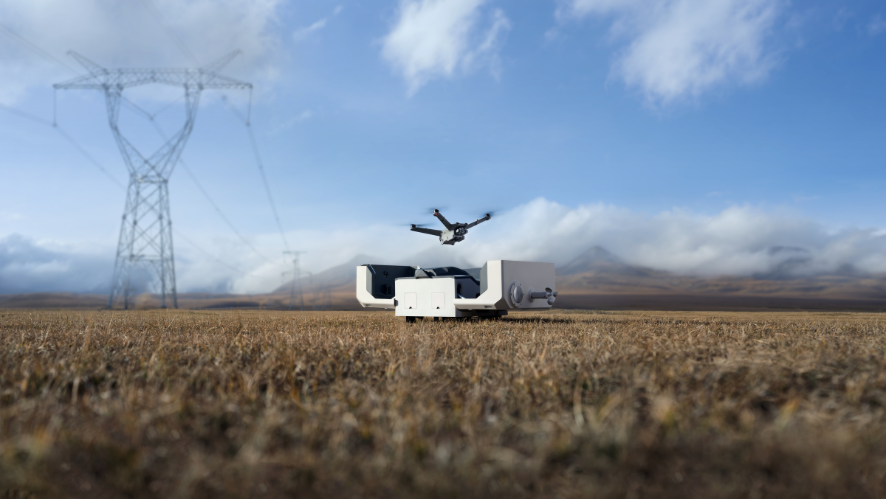
High-voltage power lines, electrical substations, telecommunications antennas, transmission towers, and industrial motors generate electromagnetic fields that can affect the drone’s compass, accelerometer, and other sensors.
Interference with the compass is particularly critical. The drone uses the compass to guide its flight path and stabilize its movements. When the surrounding magnetic field is disrupted, the drone may become disoriented and react unexpectedly, even in GPS positioning mode.
Warning sign: “compass error” or “magnetic interference” messages on the controller screen or in the flight app.
- Weather and Environmental Conditions
Wind, rain, extreme temperatures, and humidity directly affect the drone’s performance.
– Strong wind: reduces stability and can exceed the motors’ capacity, causing the drone to drift or crash.
– Rain and humidity: can seep into electronic components and cause short circuits or sensor failure.
– Extreme temperatures: affect battery capacity and runtime; in cold weather, the battery discharges more quickly.
– Precipitation: impairs visibility and can affect obstacle sensors.
Although these are not technological interferences in the strict sense, they are factors that disrupt flight with equally serious consequences.
- Interference caused by the drone itself
Sometimes, the problem lies with the equipment itself.
Loose cables, metal components near the compass, excessive motor vibrations, or damaged propellers can cause internal interference that affects the sensors and stabilization.
Incorrect assembly or the installation of uncertified accessories (cameras, gimbals, third-party batteries) can also introduce sources of interference that the manufacturer did not anticipate.
How to Avoid Interference During Drone Flights?
- Choose Your Flight Location Carefully
Before taking off, assess your surroundings. Avoid areas with high-voltage power lines, substations, high concentrations of Wi-Fi networks, telecommunications antennas, other drones, or regulated airspace (such as airports and heliports). Opt for open areas, away from electrical infrastructure and with a clear view of the sky, ensuring a better GPS signal and less interference.
- Check the GPS signal before taking off
Confirm the number of available satellites—ideally between 6 and 8 or more for stable positioning. Never take off when weak signal alerts are displayed; wait until the system indicates a reliable position.
- Calibrate the compass regularly
Calibration should be performed in new locations, after prolonged transport, when magnetic alerts are present, or in areas with potential electromagnetic interference. Perform the process away from metal structures and following the manufacturer’s recommendations.
- Select the appropriate control frequency
Whenever possible, adjust the frequency or let the system automatically select the best one. The 2.4 GHz band offers greater range but is more susceptible to interference; the 5.8 GHz band has a shorter range but tends to be less congested.
- Keep the system up to date
Regularly update the firmware for the drone, the controller, and the app. These updates improve stability, signal management, and resistance to interference.
- Check the equipment before each flight
Perform a pre-flight inspection: ensure batteries are charged, propellers and motors are in good condition, the gimbal is stable, GPS is active, the compass is functioning properly, the connection to the controller is strong, and the return-to-home point is set. This check significantly reduces operational failures.
- Avoid adverse weather conditions
Check the weather forecast before flying. Strong winds, rain, humidity, or extreme temperatures compromise stability and performance. Specialized apps such as UAV Forecast, Windy, or Skysight provide detailed data on wind, precipitation, visibility, and a safety index for drone flights.
An informed operator chooses the flight location more carefully, prepares the equipment thoroughly, interprets system alerts attentively, and knows the limits of their drone. It is this responsible approach that makes the difference between a safe and efficient flight and a preventable incident.
Fly with knowledge. Fly safely.